v1.0Free · Open source · Works offline

The office suite that is simply yours.

Write documents, crunch spreadsheets and edit PDFs in one fast desktop app. No subscriptions, no accounts, no ads. Your files stay on your computer.

Windows · macOS · Linux · System requirements

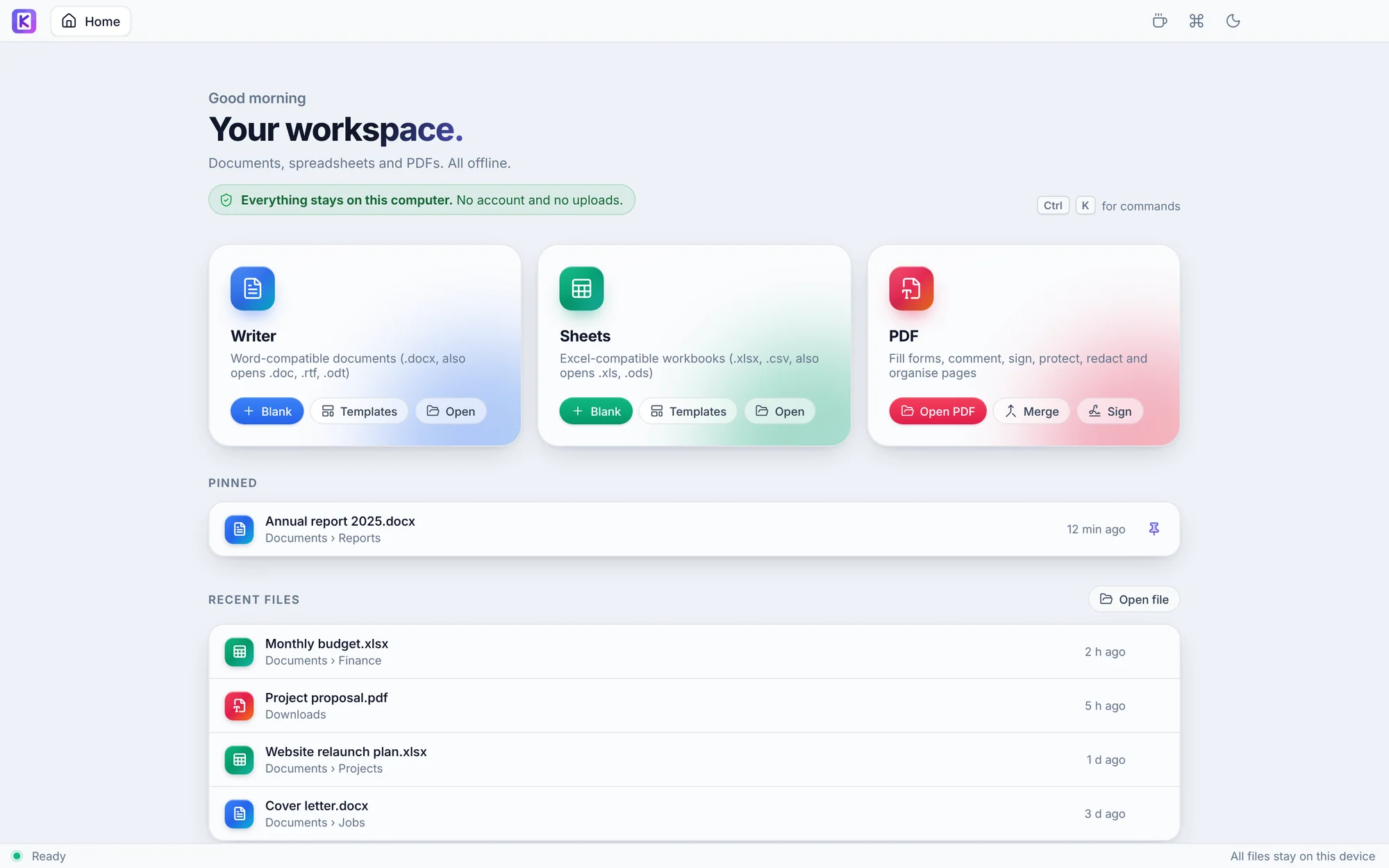
The Kertas Office home screen, with Writer, Sheets and PDF cards and a list of recent files
PSupplier contract.pdf
Digitally signed, valid
Signed with a certificate
No changes since signing
SPivotTable=SUM(D2:D9)
North
South
East
Free, no catchNo trials, no ads, no premium tier.
No accountInstall it and start working.
Works offlineEverything runs on your machine.
Open sourceEvery line public, AGPL-3.0.
Writer · Sheets · PDF

One workspace for the documents you create, edit and manage every day.

Word, Excel and PDF files open in tabs side by side. Save in familiar DOCX and XLSX formats, making it easier to exchange files with Microsoft Office users.

W

Writer

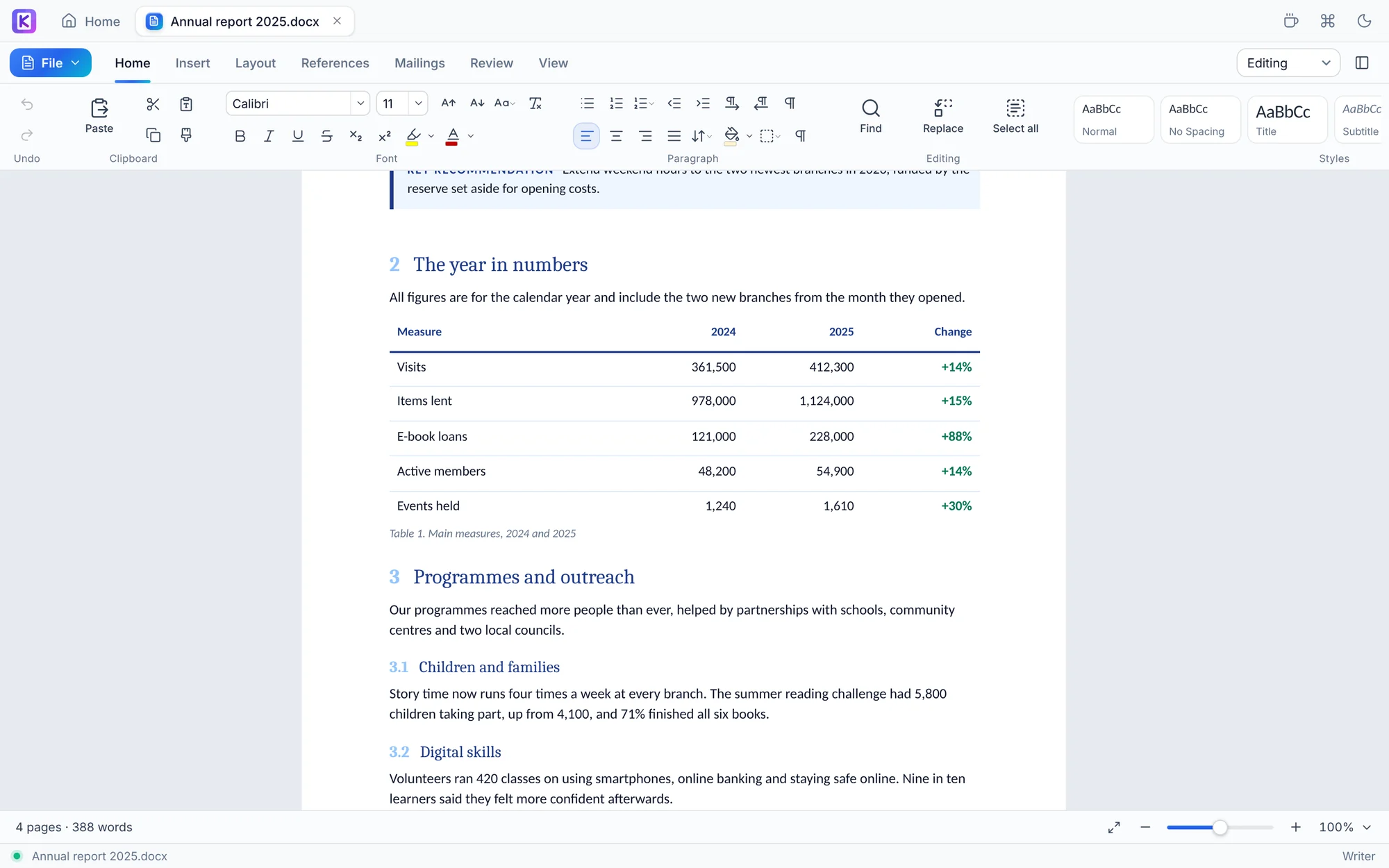
A familiar ribbon for letters, reports and theses. Opens and saves .docx, and opens .doc, .rtf and .odt.

  • Track changes and comments
  • Equations Word can edit
  • Citations in APA, MLA, Chicago, Harvard, IEEE
  • Mail merge from Excel or CSV
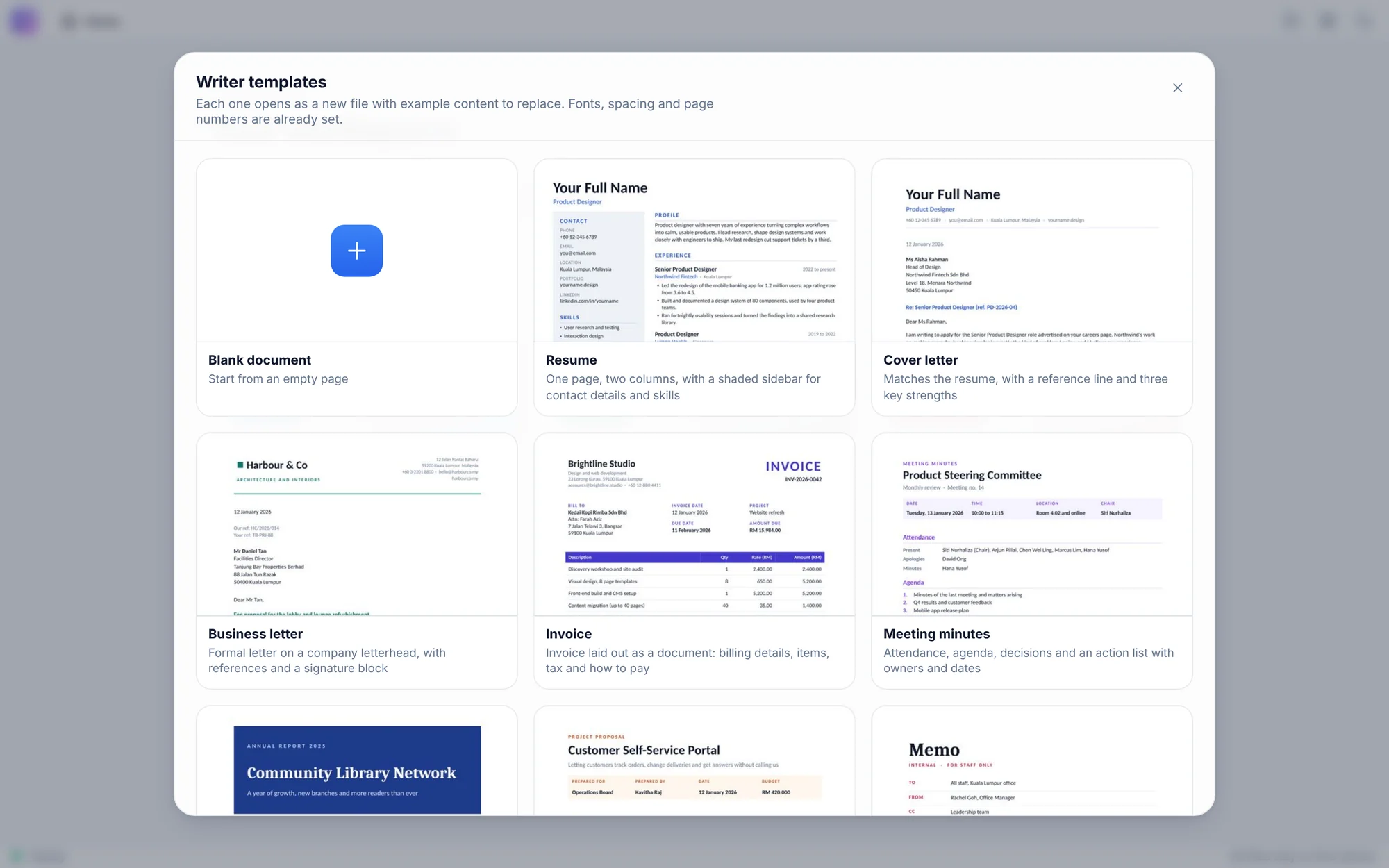
  • Eight ready-made templates
S

Sheets

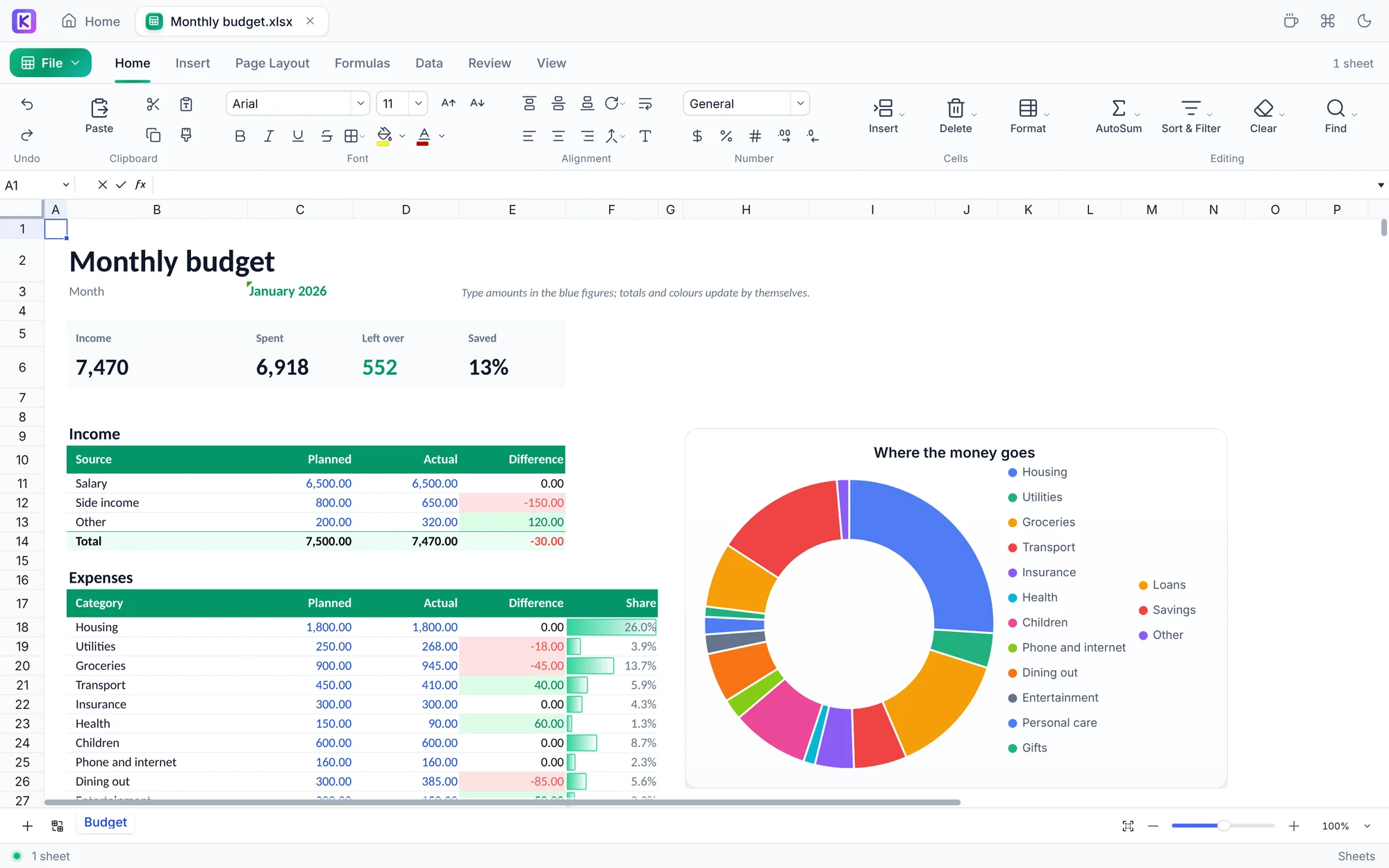
Formulas, charts and real Excel features. Opens and saves .xlsx and .csv, and opens .xls and .ods.

  • Charts that update as the numbers change
  • PivotTables that refresh
  • Conditional formatting and sparklines
  • A responsive formula engine designed for large calculations
  • Eight ready-made templates
P

PDF

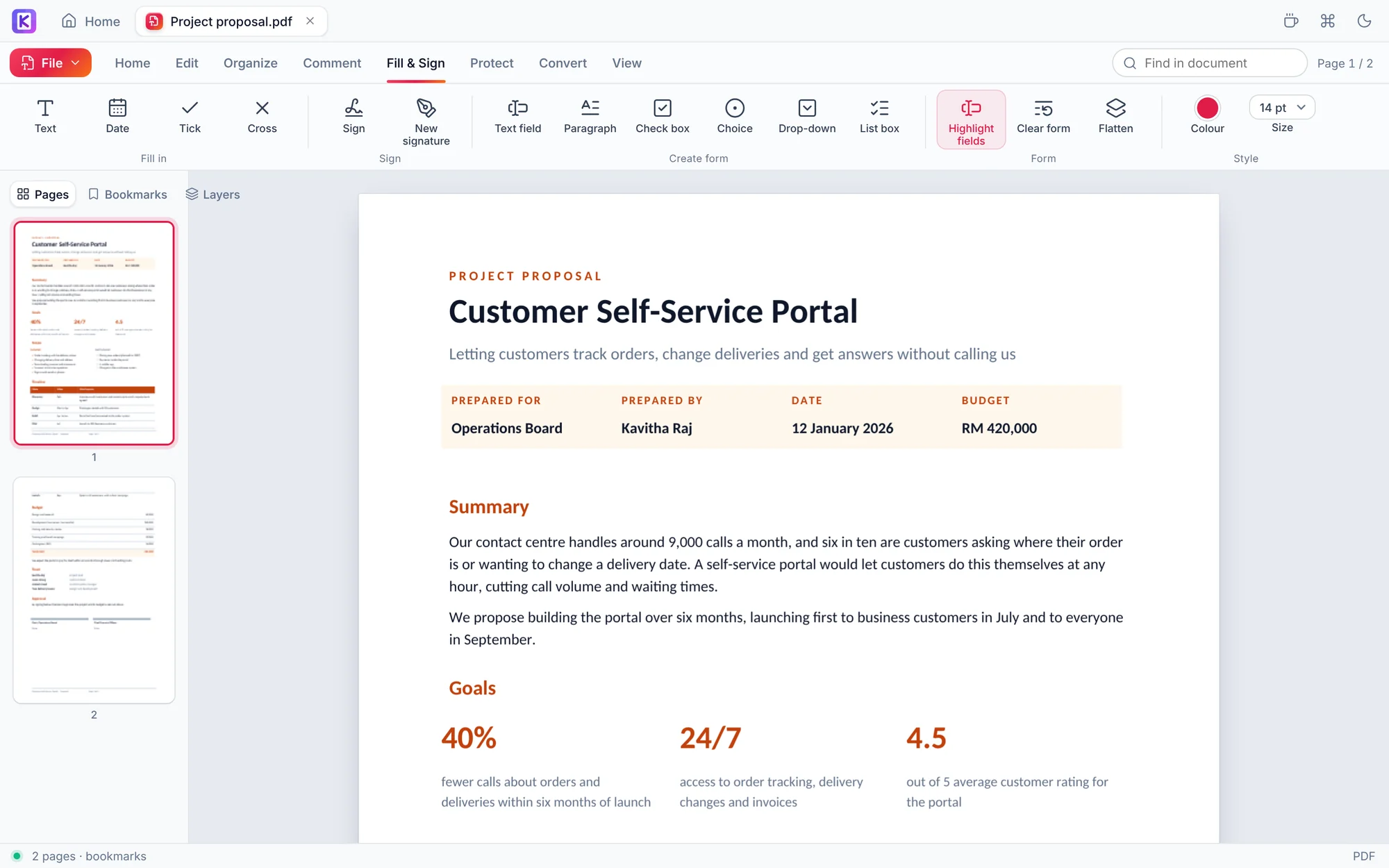
More than a viewer. Change, sign and convert PDFs without uploading them anywhere.

  • Edit the existing text
  • Sign with a certificate or by hand
  • Text recognition (OCR) for scanned pages
  • Convert to Word and Excel
  • Fill and create forms, merge and reorder pages
See it in action

A closer look at Kertas Office 1.0

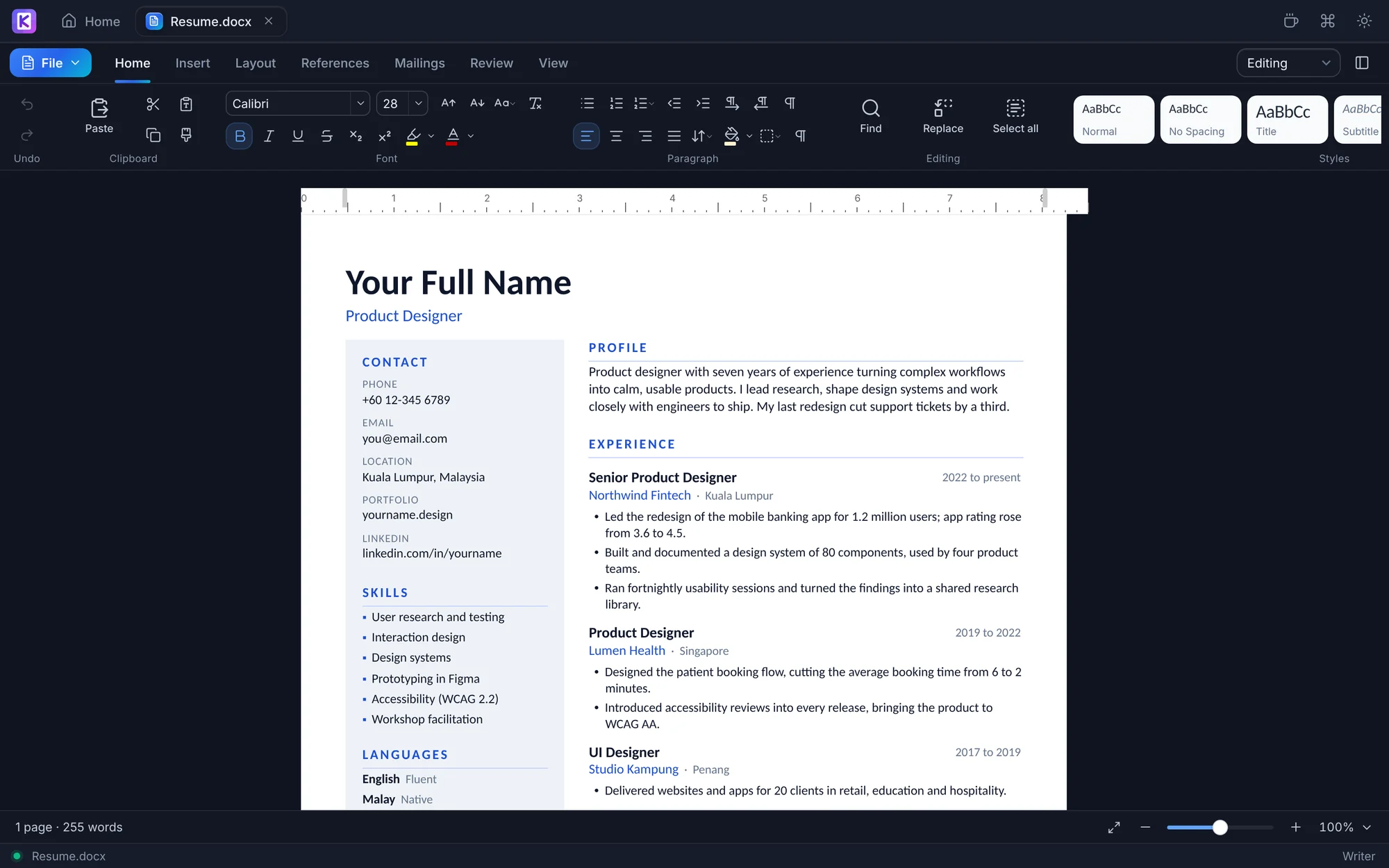
Writer editing an annual report with headings, a figures table and the Home ribbon

A familiar ribbon for letters, reports and theses, with track changes, equations, citations and mail merge.

Included, not upsold

The features other apps put behind a paywall.

Every one of these ships in the free download. There is no paid version to unlock them.

Edit PDF textClick a line and type. Kertas redraws it in the original font where it can.
Digital signaturesSign with a .p12 or .pfx certificate. Any later change breaks the seal.
OCR for scansTurn scanned pages into text you can search, select and copy.
Real PivotTablesSaved as genuine Excel pivots, and they refresh when your data grows.
Mail mergeOne letter per row of a spreadsheet, as one file or one per person.
EquationsType in LaTeX with a live preview. Saved as native Word equations.
How Kertas compares

Free should mean free.

Most people handle documents for free in one of two ways. Here is how they differ from Kertas.

Feature
Kertas Office
Freemium office suites
Online PDF tools
Price
Free, everything included
Free tier, paid upgrade
Daily limits, then subscription
Ads
None
Common in free tiers
Common
Account required
Never
For cloud and some features
Often
Your files are uploaded
Never
Only if you use the cloud
Always
Works offline
Yes
Yes
No
Edit PDF text and sign with a certificate
Included
Usually paid
Usually paid
Source code you can inspect
Yes, AGPL-3.0
Rarely
No

Describes common practice across popular freemium suites and online PDF services, not any single product. Other open-source suites, such as LibreOffice and ONLYOFFICE, share many of these values.

We publish what does not work yet.

Our compatibility page lists, feature by feature, what round-trips cleanly with Microsoft Office, what is partial and what is still missing.

See compatibility
Private by design

Your work. Your files. Your freedom.

Kertas does every edit, conversion and signature on your own computer, so nothing needs to be uploaded. The only thing it asks the internet is whether a newer version is out, and you can turn that off.

  • No uploads, no cloud storage, no sign-in
  • No usage tracking inside the app
  • Automatic saving and crash recovery designed to protect your original files
  • Source code anyone can audit
Your computerOpen, edit, sign, save
Someone else's serverNever involved

Get Kertas Office

Version 1.0. Built automatically from the public source on GitHub.

Windows
Windows 10 and 11 · Intel, AMD and ARM
Download .exe
macOS
macOS 12 or later · Apple silicon and Intel
Download .dmg
Linux
AppImage for any distribution · .deb for Ubuntu and Debian
Choose a package
Where Kertas comes from

Started by one person. Now built by its community.

Kertas, Malay for paper, began as a solo side project with a simple idea: a good office suite should not come with ads, accounts or a paid tier. With version 1.0 it became an open project that anyone can use, inspect and improve.

01 · The idea
A solo project

Built to answer a frustration many people share: free office apps that nag, upsell or upload your files.

02 · Version 1.0
Released in the open

Every line of code is public under the AGPL-3.0 licence, so Kertas stays free for everyone, for good.

03 · Today
A community project

Plans, releases and known issues live on GitHub, where anyone can report a problem, suggest a feature or send a fix.

Built in the open

Read the code, report a bug, suggest a feature or send a pull request. Files that do not open correctly are especially helpful.

git clone https://github.com/kertas-office/kertas-office.git

Support the project

Kertas has no investors and no advertisers. Contributions pay for code signing, Apple's developer programme and development time, so the app stays free for everyone.

Other ways to help: tell a friend, translate the app, or answer questions in Discussions.

Questions

Why is it free?

Kertas is built on open-source engines and released the same way. It is supported by its users, not by your data or a paid tier.

Will my Word and Excel files look the same?

Kertas saves in the native .docx and .xlsx formats, and most documents round-trip cleanly. Very complex layouts may shift slightly. The compatibility page lists exactly what is partial.

Who makes Kertas?

Kertas started as a solo project and is now developed in the open by its contributors. Anyone can join on GitHub. It is not run by a company.

Is it safe to install?

Every installer is built automatically by GitHub Actions from the public source code, so what you download matches what anyone can read. Code signing for Windows is being set up, so for now Windows may show an "unrecognised app" warning the first time. Here is what to do.Windows installers are signed through SignPath Foundation. Read our code signing policy.

Does it include presentations?

No. Kertas focuses on documents, spreadsheets and PDFs, and aims to do those three very well.

Can I use Kertas at work?

Yes, for business, school and government use alike, at no cost. The AGPL licence only adds obligations for people who modify Kertas and distribute it or run it as a service.

Free for every document you work on.

Download once. No account, no trial, no ads.

Download Kertas Office